After years working on international SEO at companies like Uber and Cornershop, and on technical SEO at Clínica Alemana de Santiago, I decided to create the tool I always wanted: a complete SEO analysis, in real-time, without leaving the browser.
Today I’m launching UXR SEO Analyzer, my first Chrome extension published on the Chrome Web Store.
What is UXR SEO Analyzer?
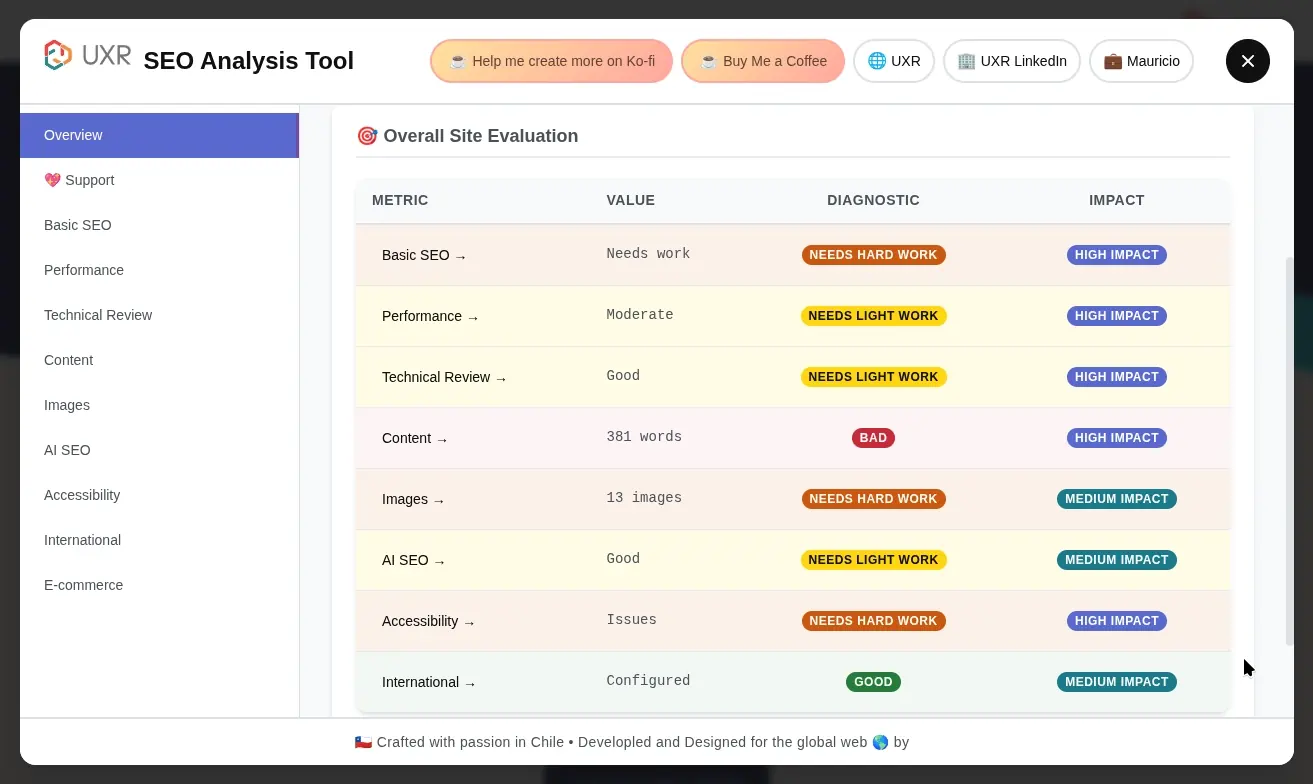
It’s a free Chrome extension that analyzes any webpage and gives you a complete SEO diagnosis in seconds. One click and you get a clear evaluation of what’s working, what needs improvement, and what requires urgent attention.
The extension organizes the analysis into 9 categories covering everything from basics (titles, descriptions) to advanced aspects (AI optimization, accessibility, e-commerce). All presented with a 4-level priority system: green (good), yellow (minor improvements), orange (important), and red (critical).
See detailed analysis of all functionalities →
Why did I create it?
Doing SEO diagnostics takes too much time, it’s repetitive, and I really didn’t want to pay for tools when I already knew how to get that information using just a web browser. My academic background and personal interest have led me to develop expertise in both SEO and UX/UI, which has enabled me to successfully build SEO teams and strategies for high-traffic websites, achieving significant impact on key business metrics. But beyond professional results, this same combination of skills motivated me to create this extension as a way to give something back to the world that has given me so much knowledge.
During the week of September 18th (Chilean National Holidays), I took a few vacation days, but since I’m as passionate about programming as a job and a hobby, I couldn’t just stop coding. While reviewing some personal projects, I started automatically conducting an SEO audit on a website, which led me to think: why not automate this tedious process I do constantly? One thing led to another and I ended up creating my first extension for Google Chrome (which also works on Chromium-based browsers like Microsoft Edge), a tool that allows you to perform a complete SEO review of any webpage with just one click.
For anyone with a website
This extension is designed for anyone who has a website, whether you manage it directly or work with technical teams to implement improvements.
The real problem isn’t that SEO tools don’t exist, but rather:
- Paid tools are expensive for analysis you can do manually
- Doing the diagnosis manually is tedious and consumes valuable time
- Many tools send your data to external servers
- Most deliver information that’s either too technical for non-specialists or too superficial for specialists
Simple information without losing precision
The extension presents information in the simplest way possible without losing the precision of important technical terms, because those specific terms are necessary to properly plan the technical solution.
I designed this tool thinking about a broad spectrum of people: from managers who need to understand SEO status without deep technical knowledge, to developers who want to validate their implementation before deployment. It’s also useful for UX/UI designers validating accessibility, marketing teams optimizing landing pages, SEO professionals doing quick audits, agencies needing free tools for the entire team, and students learning SEO practically by seeing real examples.
Principles that guided development
I created this tool with clear principles:
- ✅ Free and accessible - any professional can use it without economic barriers
- ✅ Clear analysis - simple information but technically precise where it matters
- ✅ 100% local - no data sent to external servers, complete privacy
- ✅ Level-based diagnostics - 4-level system to prioritize what to tackle first
- ✅ Actionable - specific recommendations that can be implemented
What makes this extension special
Color-coded diagnosis, simple and direct
Each issue is marked with a color: green means everything’s fine, yellow is minor improvements, orange requires work, and red is urgent. You don’t need to be an expert to understand what your site needs.
Real privacy, not just words
All analysis happens in your browser. Literally zero data leaves your computer. You can analyze internal sites, staging, localhost, whatever you want - without worrying about privacy.
Ready for the future of search
With systems like ChatGPT and Perplexity indexing the web, the extension also checks if your site is prepared to appear in AI-generated responses.
How to Install and Use?
Installation
It’s very simple:
- Visit the Chrome Web Store
- Click “Add to Chrome” or “Add to Edge”
- The UXR SEO icon will appear in your toolbar
Daily Use: Pin the Extension for Quick Access
To use the extension easily, I recommend pinning it to your Chrome toolbar:
- Click the extensions icon (puzzle piece) in the Chrome toolbar
- Find “UXR SEO Analyzer” and click the pin icon 📌
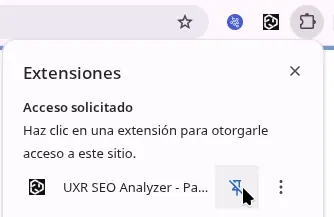
Once pinned, the UXR SEO icon will be always visible in your toolbar for quick access.
- Navigate to any webpage you want to analyze
- Click the UXR SEO icon and that’s it - you’ll see the complete analysis

That simple - just one click and you get a complete SEO diagnosis of any webpage.
See complete usage guide and functionalities →
Feedback Welcome
If you try the extension, I’d love to hear about your experience by leaving a review on Chrome Web Store.
Support the Project
The extension is 100% free, but if you find it useful, you can support me in these ways:
- 📝 Leaving a 5-star review on Chrome Web Store
- ☕ Buying me a coffee at Buy Me a Coffee or Ko-fi
- 🤝 Sharing it with colleagues who work in SEO, UX, or web development
Thank you for your support! 🚀