UXR SEO Analyzer
Complete SEO diagnostics in one click, right in your browser
100% free · No signup · No limitsKey Features
100% Free and Local
No hidden costs, no subscriptions, no usage limits. All analysis runs in your browser without sending data to external servers.
Real-Time Analysis
Get instant results while browsing. Click the extension icon on any page and receive the complete diagnosis in seconds.
Actionable Recommendations
Each detected issue includes clear issue description, priority level (1-4) with distinctive colors, estimated SEO impact (High, Medium, Low), current value vs recommended value, and specific steps to resolve it.
Complete Privacy
No registration or login required. No personal or browsing data collection. No external API calls. No trackers installed. 100% locally executed code on your machine.
Who is This Tool For?
SEO Professionals and Marketers
Technical audits without relying on paid tools. In-depth analysis in seconds. Ideal for client audits, competitor analysis, and landing page and content optimization.
Web Developers
Verify technical SEO implementation while developing. Detect issues before deployment. Validate schemas, meta tags, and performance.
UX/UI Designers
Validate accessibility and usability from the design stage. Check WCAG compliance. Review color contrast and semantic elements.
Agencies, Consultancies and Freelancers
Free tool for the entire team. Consistent, professional reports. Clear SEO diagnostics to communicate priorities to clients without deep technical knowledge.
Explore in detail
5-Level Diagnostic System
Each metric is automatically classified into one of five levels to help you prioritize which issues to tackle first:
Analysis Tabs
Overview
Get a panoramic view of your page's SEO status in seconds. This tab presents an executive summary with evaluations of all categories organized by priority level, highlighting the 5 critical issues requiring immediate attention.
Basic SEO
Verify that your page meets the essential fundamentals that search engines need to properly understand and index your content. This tab evaluates critical elements like title tags, meta descriptions, heading structure (H1-H6), canonical URLs, robots directives, Open Graph for social media, mobile viewport, and language declaration.
Performance
Measure how fast your page loads using Google's official Core Web Vitals. Includes LCP Breakdown 2025: complete breakdown of LCP phases (TTFB, Resource Load Delay, Resource Load Duration, Element Render Delay) with phase-specific recommendations. Evaluates LCP, INP (2024 interactivity metric), CLS (visual stability), FCP, TTFB, and detects blocking resources.
Technical Review
Ensure search engines can crawl, understand, and index your site correctly. Includes 2025 security analysis: COOP (Cross-Origin-Opener-Policy), CORP (Cross-Origin-Resource-Policy), HSTS, Brotli/Gzip compression, HTTP headers for performance and SEO. Evaluates URL structure, HTTPS, mobile optimization, robots.txt and XML sitemap.
Content
Evaluate whether your content is sufficient, relevant, and well-structured to satisfy search intent. Includes detection of links without rel="noopener" with specific domain listing for trust review. Analyzes word count, top keywords, text/HTML ratio, paragraph structure, readability, and internal/external links with rel attributes.
Images
Optimize your images to improve accessibility and performance. Identifies images without alt text, legacy formats (convert to WebP/AVIF for 25-35% less weight), oversized images (detects images 2× larger than display size). Includes LCP lazy-load warning 2025: detects if LCP image has lazy loading (hurts performance). Evaluates lazy loading and HiDPI support.
AI SEO
Prepare your content for AI-powered searches and LLMs. Verifies Schema.org JSON-LD with syntax validation, types (Article, Product, LocalBusiness, Organization, etc.), completeness (required vs optional properties). Detects llms.txt for LLMs (GPT, Claude, Perplexity), AI robots (GPTBot, Google-Extended, CCBot, Anthropic-AI), Content Licensing (CreativeCommons, TDMRep), and Rich Results eligibility.
Accessibility
Ensure WCAG 2.2 compliance (ISO Standard 2025). Verifies color contrast (Success Criterion 1.4.3 AA/AAA), forms with labels and ARIA, roles/attributes/landmarks (SC 1.3.1, 4.1.2), duplicate IDs (WCAG 4.1.1 Failure F77). Includes Interactive Highlights 2025: click to highlight elements with contrast issues, inputs without labels, duplicate IDs, and missing ARIA. Evaluates keyboard navigation and touch targets.
International
Expand your reach to multiple countries and languages with the correct configuration for international SEO. This tab verifies the lang attribute declaration, implementation of hreflang tags to indicate language/region alternatives, and content localization quality.
E-commerce
Maximize visibility in Google Shopping with 2025 schemas. Analyzes Product schema (name, description, image, SKU, brand), offers (price, priceCurrency, availability, priceValidUntil), reviews (aggregateRating, reviewCount). Includes 2025 schemas: OfferShippingDetails (costs, times, regions), MerchantReturnPolicy (return policies), LoyaltyProgram (new 2025), and Google Store Widget (physical locations in results).
Installation and Usage
Installation
It's very simple:
- Visit the Chrome Web Store
- Click "Add to Chrome" or "Add to Edge"
- The UXR SEO icon will appear in your toolbar
Daily Use: Pin the Extension for Quick Access
To use the extension easily, I recommend pinning it to your Chrome toolbar:
- Click the extensions icon (puzzle piece) in the Chrome toolbar
- Find "UXR SEO Analyzer" and click the pin icon
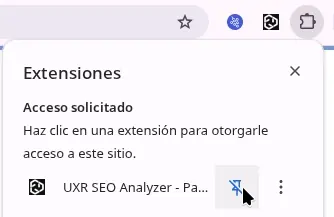
Once pinned, the UXR SEO icon will be always visible in your toolbar for quick access.
- Navigate to any webpage you want to analyze
- Click the UXR SEO icon and that's it - you'll see the complete analysis

That simple - just one click and you get a complete SEO diagnosis of any webpage.
Compatibility
- Google Chrome (version 88+)
- Microsoft Edge (version 88+)
- Any Chromium-based browser
- Firefox (uses Gecko engine, not Chromium)
- Safari (uses WebKit engine)
Frequently Asked Questions
Is it really free?
Yes, completely free with no premium features, usage limits, or hidden costs.
Do you send my data to any server?
No. All analysis runs 100% locally in your browser. The extension does not make external API calls or collect any information. No tracking, no analytics, no telemetry.
Can I use the extension on internal sites or localhost?
Yes, the extension works on any URL, including localhost (http://localhost:3000), local IPs (http://192.168.1.100), corporate intranets, sites behind VPN, and private staging environments.
Support and Community
Leave Your Opinion
If you use the extension, your feedback is very valuable. Please leave an honest review on Chrome Web Store.
Chrome Web StoreSupport the Project
Built by Mauricio from the UXR team. If you find it useful, you can support its development:
- Buy Me a Coffee
- Ko-fi
- Leaving a 5-star review
- Mauricio (UXR)